
Your Blog Keeps Growing, Even When You're Busy
SEO growth automation picks the next keyword, writes a fact-checked article around your products, adds a featured image and publishes it to Shopify, on the schedule you set.
- Drafts by default
- Monthly caps you control
- Pause any time
Weekly growth plan
Mon, Wed and Fri at 9:00 AM
Picking the next keyword
best commercial ice machine for a small cafePulling in your products
Ice MachinesHoshizakiManitowocWriting and fact-checking
Designing the thumbnail
Publishing to Shopify
Saved as a draft on your Shopify blog
Why automate
SEO Rewards Consistency. Most Stores Can't Keep Up.
Google trusts sites that publish useful content steadily. The hard part isn't writing one article, it's writing the fiftieth.
Publishing stalls when you get busy
A blog only grows if it keeps publishing. Most stores post in bursts, then go quiet for months.
Keyword research never ends
Every article starts with deciding what to write about, and that decision is the first thing to slip.
Agencies cost thousands a month
Hiring writers or an agency to keep up a steady schedule rarely pays back for a small store.
The case study
250 Articles, Published on a Schedule
A commercial kitchen parts store on Shopify. Their product catalogue became a steady stream of SEO articles while their team ran the store. May 2025 – Sep 2026.
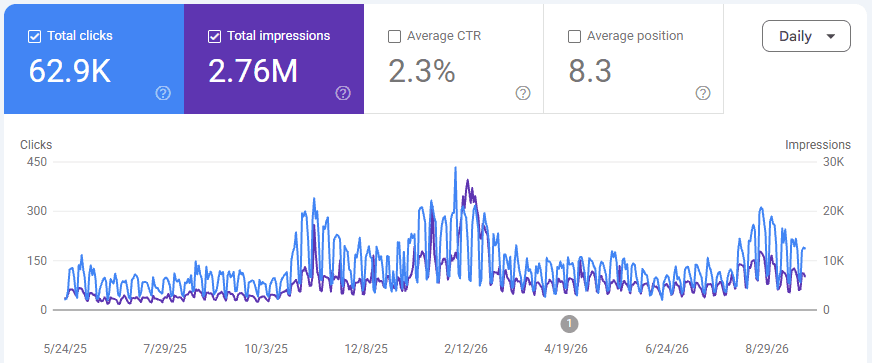
Steady publishing compounds
Each article targeted a specific buyer question around their parts and brands. Published one after another, they added up to a blog Google sends traffic to every day.
- 2.76M impressions and 62.9K organic clicks
- 150 keywords on page one of Google
- Every article built from their own products, with a featured image
How it works
Set It Up Once in About Five Minutes
After that, every run happens on its own. You get the articles, the run history, and the final say.
- 1
Point it at your brand
Pick a brand profile. Its products, collections, pages and tone are what every article is built from.
- 2
Choose what to write about
Give it a list of topics, send it a keyword collection, or let it pick your best Search Console queries.
- 3
Set the schedule and the limits
Daily or on chosen weekdays, at the hour you pick, up to 10 articles per run, with a monthly cap you control.
- 4
Review or let it publish
Articles land as drafts for you to check, or go straight to your Shopify blog with a featured image.
What to write about
Three Ways to Feed It Keywords
Use one, or run separate automations for each.
Your topic list
Work through the topics you care about in order. Each one is rewritten as a buyer-intent keyword, so a short list keeps producing fresh articles.
Search Console opportunities
Connect Google Search Console and it writes around the queries and pages already earning clicks or impressions, so you build on what is working.
Keyword collections
Plan a long-tail keyword collection from your store, then send it to an automation in one click.
Hands-Free Doesn't Mean Out of Control
Automation is only useful if you can trust it. Every automation comes with limits and a paper trail, so you always know what was published and why.
Drafts by default
Nothing goes live until you switch auto-publish on. Drafts wait in Shopify for your review.
A monthly cap per automation
Each automation stops at the cap you set (10 a month to start), so spending never surprises you.
Fact-checked before publishing
Claims are checked with live web search and corrected, and the run notes anything it could not verify.
No repeat articles
Topics you already have articles for are skipped, and the run history says so.
A clear run history
Every run shows the keyword, the article, and why anything was skipped or failed.
Pause any time
Turn an automation off, edit it, or run it once by hand to test a change.
Every article
Written Like Your Best Marketer Would
Built from your products
Articles link and feature the right products and collections from your store.
Featured image included
A thumbnail in your brand is made for each article and set as the featured image.
Varied formats
How-tos, comparisons, top lists, reviews and more, matched to each keyword so the blog never feels repetitive.
Your tone of voice
Choose a tone and add instructions; every article follows your brand guidelines.
Internal links that build authority
Each article links to your relevant products, collections and pages, so authority flows to what you sell.
One per brand, or several
Run separate automations for different brands, topics or schedules.
Plans
Automations on Every Paid Plan
Each plan runs a set number of automations at once. Automated articles come out of your plan's monthly articles.
Kickstart
1 automation
Up to 25 articles a month
SEO Takeover
5 automations
Up to 90 articles a month
The free plan lets you try article writing by hand. Automations start on Kickstart.
Free
See the output on your own products before you pay anything.
Free forever, no card needed
- 2 articles per month
- Shopify product integration
- Basic SEO formatting
- Community support
- Bulk generation
- Article thumbnails
- SEO growth automations
- Priority support
Kickstart
For smaller Shopify stores starting their SEO journey.
Billed $276 yearly
- 25 articles per month
- Shopify product integration
- Advanced SEO optimization
- Bulk article generation
- Product & collection linking
- Article thumbnails with your branding
- 1 automation running on a schedule
- Priority email support
Why upgrade? Two articles shows you the quality. Consistency is what moves traffic: 25 a month is enough to publish several times a week, with bulk generation across your catalog.
SEO Takeover
For growing stores that want publishing to run itself.
Billed $948 yearly
- 90 articles per month
- Shopify product integration
- Premium SEO optimization
- Bulk article generation
- Product & collection linking
- Article thumbnails, made automatically
- 5 automations running on a schedule
- 24/7 Priority support
Why upgrade? Five automations keep several topics or brands publishing at once, with articles and thumbnails pushed to Shopify without you. 90 a month covers a large catalog in months, not years.
Done For You
For businesses that want SEO handled end to end.
Unlimited platform access included
- Technical SEO audit & fixes
- Keyword & competitor strategy
- Product & collection optimization
- Unlimited blog content, managed
- AEO & GEO
- Monthly report & strategy call
Why go managed? A dedicated strategist runs everything — technical fixes, keyword strategy, product optimization and the blog — and reviews results with you every month.
FAQ
Automation Questions, Answered
What is SEO growth automation?
It is a scheduled job that picks a keyword, writes an SEO article around your products, fact-checks it, adds a featured image and publishes it to your Shopify blog, on the days and at the time you choose.
How many automations can I run?
Kickstart runs 1 automation at a time and SEO Takeover runs 5. The free plan does not include automations. You can set up more and switch between them; only the active ones count.
Do automated articles count toward my monthly articles?
Yes. Automated articles come out of the same monthly allowance as articles you write by hand: 25 on Kickstart and 90 on SEO Takeover. Each automation also has its own monthly cap.
Will it publish without me checking?
Only if you want it to. By default articles are saved as drafts. You can push them to Shopify as drafts, or switch on live publishing once you trust the results.
Can it use my Google Search Console data?
Yes. Connect Search Console and an automation can write around the queries or pages already getting the most clicks or impressions, over the time window you choose.
What happens if I downgrade?
Your longest-running automations keep going up to your new plan's limit, and the rest pause with a note explaining why. Nothing is deleted.
Want the featured images on their own? See the thumbnail generator
Set Up Your First Automation Today.
Pick your keywords and a schedule. Your next article will be waiting for you, written, illustrated and ready to publish.
Results come from one client's store and vary by niche, competition and publishing pace.